

Custom Conveyor Belt Production Line Design Strategies for Peak Efficiency
2026-11-02
Most custom conveyor belt lines are overbuilt in some places and under-designed in others—until you trace the root cause, you're just guessing. At SFC, we reverse that logic: start with the material, the speed, the real floor layout, then design backwards. This post shares the specific strategies that separate a line that runs at 92% efficiency from one stuck at 74%.
Let Real Load Data Set Your Drive and Motor Specs
Real load data cuts through the guesswork that often inflates drive and motor sizing. Instead of relying on worst-case assumptions or adding a generous safety factor, you can capture actual torque, speed, and current demands over a full operating cycle. This profile reveals how much headroom you really need—and where you’re paying for capacity that never gets used.
When you let measured behavior guide the specs, the result is a tighter match between the mechanics and the electronics. Peak loads, continuous duty, and regenerative spikes all show up in the data, letting you choose a drive that handles them without oversizing. The payoff shows up as lower initial cost, less panel space, and reduced energy waste because the motor runs closer to its efficient zone.
Some teams still default to a nameplate rating from the machine builder or a rough approximation from a similar application. That habit leads to drives that loaf along at 40% utilization or motors that trip faults on every start. Replacing those assumptions with logged current and voltage from the actual process changes the conversation from “bigger is safer” to “right-sized is reliable.”
Build Frame Modules for Quick Line Expansion
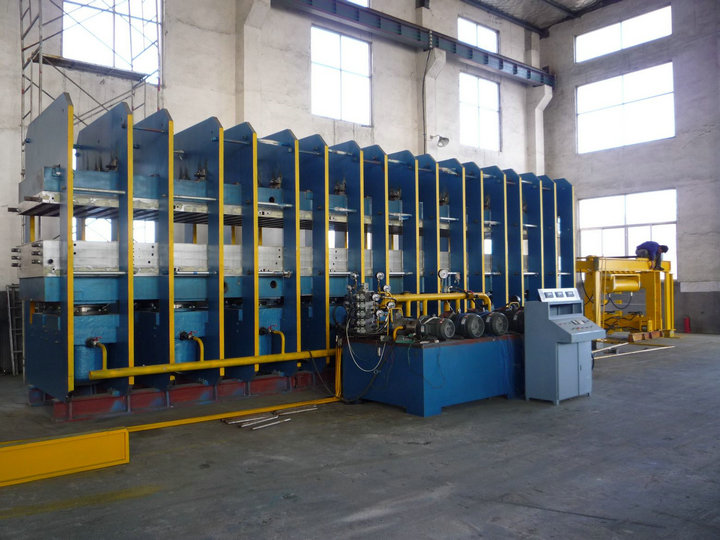
Frame modules are not just structural components; they are the backbone of rapid line expansion. By standardizing the connection points and load-bearing profiles, plants can cut setup time from weeks to days. This approach allows teams to slot in pre-assembled sections without re-engineering the entire layout, keeping product flow uninterrupted.
When each frame module is designed with modular mounting rails and tool-free alignment features, reconfiguration becomes a matter of repositioning rather than rebuilding. Operators can shift a welding cell or an inspection station in a single shift, then lock the frame into place using the same base anchors as before. That level of flexibility is what turns a fixed production line into a living, adaptable system.
The real payoff comes when demand spikes or a new product variant is introduced. Instead of commissioning a brand-new line, you reuse existing frame modules, add a few specialized brackets, and run the first article within hours. Downtime drops, capital expenditure stays low, and the team gains the confidence to experiment with line balancing without risking a major disruption.
Place Drives Where Operators Actually Work
The idea sounds obvious once you hear it, but most setups still bury drives in a central rack far from the people who use them every day. Moving storage directly into the operator's workspace changes how quickly data gets pulled, pushed, and verified. It removes the unnecessary walk, the awkward reach, and the delay between thinking about a task and getting the files loaded. When the drive sits within arm's reach, the workflow feels less like a factory line and more like a natural extension of the job.
There's also a subtle shift in responsibility that comes with physical proximity. Operators start treating the drive as their own tool, not some distant shared resource. They label it, keep it organized, and notice problems earlier because they're the ones swapping it in and out. A drive that lives where the work happens gets maintained differently than one that only appears during shift changes or failures.
In practice, this might mean mounting a small drive bay under a monitor, adding a hot-swap slot to the side of a control desk, or simply routing a cable to a labeled port next to the keyboard. The exact location matters less than the principle: if the operator has to leave their station to use storage, the layout is working against them.
Reduce Belt Tension Losses Before They Heat Up
Belt tension loss doesn't announce itself with a warning light—it shows up as a gradual slide in output, a subtle whine from the drive, or a heat signature you catch too late on the infrared gun. By the time the surface temperature climbs past what you'd expect for the load, the elastomer has already started glazing, and the cords inside are working against each other instead of together. The fix starts with measuring tension cold, before the first shift run, using a proper tension gauge rather than a thumb-press guess. Most drives are set to a target rib deflection that accounts for break-in stretch, but if you skip the re-tension after the first 24–48 hours, you've already donated a chunk of the belt's service life to heat.
Heat and tension loss feed each other in a loop that's hard to break once it starts. A slack belt slips microscopically on the pulley, friction raises the contact zone temperature, the rubber compound softens, and the belt stretches a little more—so the slip worsens. Within days, the pulley grooves polish to a shine, and the belt's sidewalls lose their bite. One overlooked trick is to check pulley alignment at the same time you check tension: a misaligned drive can mimic tension loss because the belt rides up one flange and runs hotter on that edge. Use a straightedge across the pulley faces, or a laser alignment tool if the center distance is long. If you find more than a few degrees of twist, correct the motor base before pulling more tension into the belt—tightening against misalignment just transfers the wear from the belt to the bearings.
For drives that repeatedly drop tension even after proper cold-set and re-tension, look beyond the belt itself. A worn pulley with a U-shaped groove instead of a crisp V will never hold the sidewall contact area the belt needs, no matter how tight you make it. The belt sits deeper, the effective pitch diameter shrinks, and the drive ratio shifts slightly—often enough to push a downstream load into a hotter operating range. Swapping in a new belt on worn pulleys is a temporary mask; the new belt's cords will fatigue faster and the heat returns. If budget allows, move to a cogged raw-edge belt on smaller diameter drives—the notched underside reduces bending resistance, which lowers the internal heat generated at each flex cycle. It won't fix a worn sheave, but it buys time while you schedule the replacement, and it runs noticeably cooler on tight-radius drives.
Plan Adjustments Around Production Slots, Not Downtime
When a line runs behind schedule, the instinct is often to carve out downtime for repairs or rebalancing. That rarely helps. Instead, treat every production slot as a movable piece. Shift the sequence of jobs, pull forward a shorter run that uses the same tooling, or reassign a partially completed batch to a parallel cell. The goal is to absorb the delay without ever stopping the line.
Operators know which combinations actually work on the floor. Ask them which jobs can swap places without triggering a setup, and which ones need a buffer. Build a small library of these swap options for each bottleneck. When a slot breaks down, you already have three or four alternatives ready, not an emergency meeting.
The biggest mistake is waiting for a formal shutdown window to fix everything. Small adjustments made during running production—shaving five minutes from a cleaning cycle, moving a low-priority job to tomorrow's second shift, or delaying a non-critical material change—add up faster than any planned maintenance block. Keep the line moving, and fix the problems around the edges.
Turn Speed Drops Into a Weekly Tuning Routine
Speed drops aren’t random annoyances—they’re clues. Instead of waiting until a video call freezes or a file crawls, set aside fifteen minutes on the same day each week to check what changed. Keep a simple note on your phone or a sticky on the router: jot down the download and upload numbers, the time of day, and which devices were active. After two or three weeks, you’ll start seeing patterns, like a smart TV hogging bandwidth every Thursday evening or a microwave knocking out the 2.4 GHz band during lunch.
Once you’ve got a baseline, turn the weekly check into a small tune-up ritual. Move your router a few inches if the signal dips in one corner, switch a crowded channel, or update firmware that’s been ignored for months. You don’t need fancy tools—most routers have a built-in speed test or a diagnostics page that shows connected devices and signal strength. The point is to make one tiny adjustment each week, not to overhaul everything at once. That way, a speed drop becomes a trigger for a micro-fix rather than a reason to curse the internet provider.
The real payoff comes after a month or two, when you can look back at the log and see how small changes added up. Maybe you moved a cordless phone away from the router, limited a backup schedule to overnight hours, or replaced an ancient ethernet cable. Each tweak is unremarkable on its own, but together they keep your network from sliding into a slow, frustrating mess. And because it’s a weekly habit, you’ll catch problems before they turn into an all-day troubleshooting marathon.
FAQ
Start by mapping out the actual material flow, including peak load times and any bottlenecks from existing processes. Get input from operators who work the line daily—they often know where delays actually happen. Only after that should you lock in belt type, drive placement, and frame dimensions. Skipping this step usually leads to overbuilding or underbuilding the system.
Base it on the maximum payload per minute and the physical characteristics of the product, like weight, shape, and fragility. For wide or unstable items, you might need a slower, wider belt with side guides. Running a few pilot tests with adjustable speed drives before finalizing the spec saves a lot of rework later.
Choosing the belt surface and frame coating based on the environment—heat, oil, abrasives, or washdown chemicals—directly affects how often you stop for repairs. For example, a nitrile-covered belt handles oily parts better than standard rubber, and stainless steel frames prevent corrosion in food processing. The right match can cut unplanned stops by half in harsh settings.
Using standard frame sections and bolt-together components lets you extend, shorten, or reconfigure the line without replacing the whole system. That means when you add a new packaging station or change product sizes, you only swap out a module instead of redesigning from scratch. It also keeps spare parts inventory simpler.
Focus first on automatic belt tracking and tensioning, plus variable frequency drives for acceleration control. These reduce manual adjustments and energy waste. Once those are in place, sensors for jam detection and product spacing can pay for themselves quickly by preventing cascade failures. Avoid adding full robotic palletizing until the basic line runs smoothly.
Look at the total cost over five to seven years, not just the purchase price. Higher-efficiency motors and low-friction belt materials cost more upfront but often cut energy use by 15-25%. Also consider regenerative drives for declined sections—they can feed power back into the grid. Run the numbers with your local utility rates; in many places the payback is under three years.
The biggest one is creating too many transfer points where products change direction or elevation. Each transfer risks jams and product damage. Another mistake is placing inspection or manual stations too close to high-speed sections, forcing workers to rush. Straight runs with gentle curves and ample buffer zones between stations usually improve flow more than adding speed.
Design every section with at least 36 inches of clear space on one side, and place wear components like rollers and bearings where they can be reached without removing guards. Use quick-release guard panels and consider lift-up belt sections for cleaning underneath. If a technician needs a ladder or special tool for routine lubrication, you've already lost efficiency.
Conclusion
Sizing the drive and motor based on real-world load data rather than rough estimates prevents both oversizing and undersizing, which are common inefficiencies. Analyzing actual production demands lets you match torque and speed requirements precisely, reducing energy waste and wear. Similarly, designing the frame as modular sections allows the line to be extended or reconfigured quickly when production needs change, without major rebuilds. And placing the drives at operator working height and reach minimizes the time spent walking or reaching during routine adjustments, keeping the line running longer between interventions.
Belt tension losses should be addressed proactively: adjusting tension before friction generates excessive heat avoids energy loss and premature belt failure. Instead of scheduling full shutdowns for maintenance, plan adjustments around existing production slots, such as between batches or shift changes, to keep throughput high. Finally, monitor speed drops as part of a weekly tuning routine. Rather than waiting for a noticeable slowdown, small weekly corrections keep the conveyor running at optimal speed, preventing gradual efficiency erosion over time.
Contact Us
Contact Person: Chen Zhengwei
Email: [email protected]
Tel/WhatsApp: +86-13963975727
Website: https://www.sfcrubbermachine.com